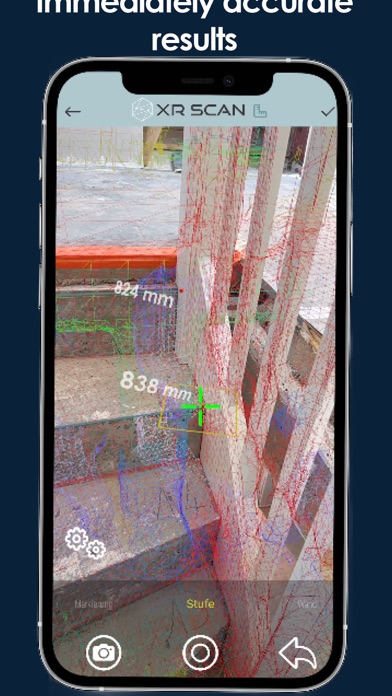
1. With XR Scan, costs, effort and results of technical measurement are now in ideal proportion: As a completely digital business process solution, errors due to manual measurements / data transfers are as much history as the small-scale and time-consuming post-processing of huge point clouds.
2. Digital measurement at the touch of a button: 3D LiDAR Scan for iPad and iPhone directly creates a planning measurement in the form of an intelligent 3D model in CAD format - award-winning B2B solution, without intensive post-processing and accurate enough for industrial production.
3. Fully digital measurement with LiDAR and augmented reality is significantly faster and more accurate than comparable methods, delivers instant results without post-processing, and is usable at the touch of a button - without development costs or cumbersome integration.
4. intuitive: XR Scan does not require intensive training or specialized staff to create a planning-based measurement, thanks to guided use and the elimination of time-consuming post-processing.
5. end-to-end: The measurement app from A to Z - XR Scan accompanies users through the entire technical measurement, from capturing the environment to the measurement data to the digital 3D model for further use.
6. - Use the 3D model created from the measurement data in CAD format without time-consuming post-processing.
7. flexible: XR Scan can be used on a maximum number of devices, works with common data formats and third-party programs, and can also be used offline.
8. scalable: From a craftsman's business to a corporate group, XR Scan adapts to the size of its tasks, can integrate any number of users and multiple organizational levels.
9. Remote rendering & more: In the backend, the Spacific Solution Portal, various other services are available to you on request, such as the use of APIs or Azure services like remote rendering.
10. COTS: The latest technology as an off-the-shelf solution does not require high investments before it pays off - without having to invest in custom developments, without complex integration into your system.
11. XR Scan is available as a license model and offers package sizes for any form of commercial use.
Если вам нравится XR Scan, вам понравятся Utilities такие приложения, как; 隐藏式记录仪——迈卡盾; JLL Let's audit; Q Codes; Рулетка AR Measure: Линейка 3D; Height and Weight Tool; Height and Distance; Калькулятор BSA - ППТ Расчет; Height Measure - SnapTall; Measure Body Height; Счетчик схваток +; 星光奔跑- Light Running; КриптоКлюч; QuickPrint - Thermal Printing; Sad Jack Russell Stickers; Goofy Jack Russell Stickers; Happy Jack Russell Stickers; Fat Jack Russell Stickers; CPU Identifier; CPU Info; CPU-Kit: Device Info & Monitor;