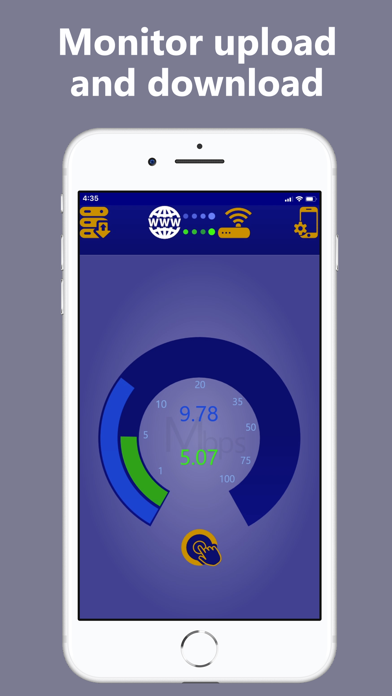
1. Real time download (blue) and upload (green) speeds are live calculated using the total traffic reported by your WiFi / WLAN router or modem, and therefore include all web traffic, not just the speed.
2. See in real time the immediate effect of your ISP connection getting overloaded as it tries to meet all the demands of your family members or work colleagues – and immediately diagnose complaints of slow internet speed, internet slowness, WiFi speed, gamer lag etc.
3. The yellow arc acts like a real live calculator of the test, presenting how much bandwidth is available, followed by results giving your utilization as a percentage of the average total connection speed.
4. • Standard speed test results, as a percentage of the total ISP connection (utilization), decrease as connection congestion increases, at which point they no longer reflect the connection’s capabilities.
5. • Standard speed tests have to be run to give an indication of your ISP connection’s capabilities, whereas SpeedTestPlus constantly displays the current speeds on your link regardless, and without consuming precious bandwidth for a speed test.
6. Run SpeedTestPlus to see at a glance how much download (blue) and upload (green) traffic is currently on your home or office Internet / WiFi / WLAN connection.
7. Go beyond the speed monitor by pressing the button to initiate a speed test, generating the extra www traffic (yellow) needed to push your ISP connection to its maximum speed.
8. • Selectable speed test connection count; controls how aggressively it pushes your connection to the maximum speed.
9. Troubleshoot your ISP connection at an advanced level but without any complex configuration like SNMP or MRTG – great for sysadmins , ISP call centres , helpdesks and IT support staff to help their internet users.
10. • SpeedTestPlus reports difficulties communicating with the WiFi modem or WLAN router, which can indicate weak signal/interference on your WiFi / WLAN; another cause of poor performance.
11. SpeedTestPlus requires connection to a compatible WiFi modem or router.
Если вам нравится SpeedTestPlus, вам понравятся Utilities такие приложения, как; AirDroid Browser - Pure&Secure; System Info - Monitor RAM & OS; Door to isekai; Fully Noded - Join Market; Universal TV, Remote Control; Cast To PC & Mac AirDroid Cast; Universal TV Remote: All TVs; Remote Control for TV •; TV Remote for Sony; Передача файлов; DWG to Image; Повтор Экрана на Смарт ТВ・; Easy WiFi Config; My Locations - Watch your locations; AEI Keyboard Note Dutch; Easy Mailer English Keyboard; Symbol Atlas; K4us Italian Keyboard; AEI Keyboard Note Danish; K4us Spanish Keyboard;